Wednesday, 28 December 2011

The 10 biggest tech stories of 2011
The 10 biggest tech stories of 2011
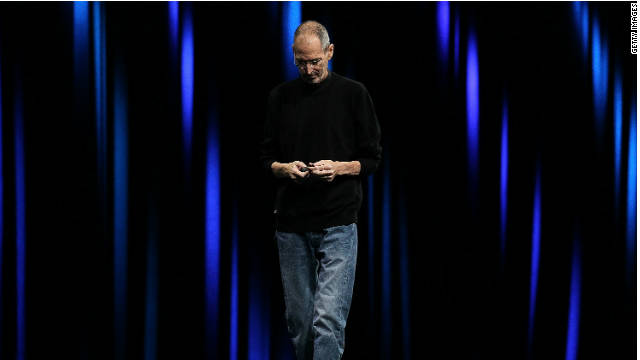
The world of entertainment mourned and remembered Steve Jobs with social media mentions.
STORY HIGHLIGHTS
- In 2011, perhaps no news story was bigger than the death of Steve Jobs
- Social media was used heavily to organize protest around the world
- Mysterious hacker groups rose to prominence in 2011
Very influential tech pioneers died; cyber-security cost companies billions of dollars; and trends in electronics and on the Web provided new tools and created new challenges.
Smartphones and tablets each grew so immensely this year that we decided to give them their own mobile year-in-review list.
As for future talk, there were plenty of bold, futuristic initiatives that did not quite bear fruit this year.
The seeds of Hewlett-Packard's mobile strategy, Google's plans for Motorola post-acquisition, Intel's 3-D silicon transistors and mobile payment systems like Google Wallet were planted this year. But those stories were left off of this list because their products did not reach a mass market in 2011. Look for those to make big splashes in 2012.
These 10 stories in 2011 had a huge impact that could resonate for many years:
1. Steve Jobs dies
From humble middle-class roots to running the most valuable tech company in the world, Apple co-founder Steve Jobs was powerful and revered. His death on October 5 after a long battle with cancer made waves around the world.
Public grieving could be seen outside Apple's hundreds of stores, where fans left flowers, candles and written notes of tribute. His authorized biography by Walter Isaacson, which came out in November, instantly became a bestseller.
At Apple, Jobs helped create the personal computer industry, and built a team that worked with him to design mega hits like the iMac, iPod, iPhone and iPad. He also found time to lead Pixar Animation Studios, the "Toy Story" creator that the Walt Disney Co. paid $7.4 billion to acquire in 2006.
The fast-paced tech industry halted for a moment after Jobs' death this year, prompting business and world leaders to speak publicly about his impact. It may never be the same after.
2. Social media's role as a tool for protestors
Much praise was heaped on Facebook, Twitter and YouTube after they played a role in the Arab Spring, a series of protests in the Middle East that started late in 2010.
Use of social networks to spread the word about demonstrations persisted this year, especially in the Egyptian uprising that toppled longtime President Hosni Mubarak.
In London, participants in riots used BlackBerry Messenger.
Micro reports from Occupy Wall Street and other U.S. protests frequently popped up on Twitter.
Perhaps in a nod to those events, Facebook CEO Mark Zuckerberg said onstage at his conference this year, "We exist at the intersection of technology and social issues."
3. Hackers
The Guy Fawkes mask, a stark white symbol of political upheaval, can be seen at many Occupy protests, but the accessory from the movie "V for Vendetta" was adopted earlier by an online group called Anonymous.
Members of the loosely organized group emerged from the Internet underground this year with a series of politically fueled computer attacks on churches, e-commerce and banks. A sister group called Lulz Security staged its own hacks before quickly vanishing.
After Sony's online networks had been hacked, researchers discovered a file planted on one of its servers containing the Anonymous chant, "We are legion." The word "hack" was so ingrained in people's vernacular after all of these incidents that it became a catchphrase anytime a site was down or an account password had been stolen.
4. Tablet market gets dozens of new entrants
The decade-old tablet PC market received a jolt with new products this year, sparked by the massive success of Apple's iPad.
Electronics makers tried to figure out whether consumers were looking for tablets or just iPads. Google, with its Android tablets, and Research in Motion, with the BlackBerry PlayBook, were not pleased with the answer.
Amazon.com may have cracked the formula with its $199 Kindle Fire. It has been selling about a million devices each week since it debuted in November. Hewlett-Packard only managed to attract meaningful sales to its TouchPad when it ran a $99 fire sale to clear inventory.
5. Facebook and partners add 'frictionless' sharing
What do you call it when someone you know finds out something about you without you telling them?
Facebook calls it "frictionless," and companies that have implemented the feature, including some music-streaming services and news publishers, have found a great promotional vehicle.
Still, many are opposed to their private reading habits being broadcast instantly to their Facebook pages. Zuckerberg is convinced people will continue publishing more about themselves online each year -- now, whether they actively choose to or not.
6. Patent wars
The biggest names in mobile, including Apple, Google, HTC, Microsoft, RIM and Samsung, have engaged in a giant game of patent Risk.
These companies have filed lawsuits and countersuits in countries around the world to seek licensing agreements or block the sale of rivals' products. Google has said that its $12.5 billion acquisition of Motorola Mobility was to gain the phone maker's stockpile of patents.
Check with your local government about whether you can legally buy a Galaxy Tab in stores this week.
7. Google+
People are spending more of their time on social networks than searching the Web. In other words, more Facebook and less Google.
So Google created its own Facebook-like environment in Google+. Users can share photos and browse friends' updates.
Google+ got off to a promising start, but Facebook has had a long lead. Google asserts that its social network is key to the future of the company. That's a big bet.
8. Apple becomes the most valuable company in the world
When Jobs returned to Apple in 1997, he said the company was weeks away from bankruptcy. Over the next decade, he orchestrated a masterful turnaround that culminated in Apple briefly becoming the world's most valuable company by market capitalization.
Exxon Mobil has reclaimed a sizable lead, but that shouldn't undermine how effective Apple has been in creating a lust for gizmos. The ultra-thin iPad 2 has done gangbusters, and the iPhone 4S, with Siri, has introduced voice-command services to a wider audience this year.
9. IBM's Watson beats human champs on 'Jeopardy!'
At times, the Watson computer, built by IBM, failed to understand some nuances of the English language, prompting mocking laughter.
However, as the world had learned when IBM's Deep Blue defeated chess champion Gary Kasparov, computers aren't clueless. Watson proved that two smart men, Ken Jennings and Brad Rutter, were no match for banks of servers running artificial-intelligence software.
10. Spotify and Facebook take on digital music
With iTunes and iPod, Apple had a strong formula for dominating the digital music industry. Amazon and Google haven't made a dent.
But Spotify has proved itself as a worthy opponent in Europe, and after years of negotiations with the record labels, it finally hit U.S. shores this year.
Facebook Music, a page that shows what friends are listening to, has helped introduce wider audiences to on-demand streaming services like Spotify, MOG, Rdio and Rhapsody.
HTC, Samsung and Blackberry are the most talked about Smartphones in Social Media in India
HTC, Samsung and Blackberry are the most talked about Smartphones in Social Media in India
Company BriefBangalore, December 28, 2011
Simplify360, a leader in social media analytics today released a report on Social Media Insights on Smartphones. The total data collected for the research was above 3,00,000 in various social media sites including microblogs, social networks and blogs etc.
“As smartphones become more and more popular and common, it is imperative to know what attributes of these phones do people actually like/ dislike. The idea of the study was to understand consumer’s perception of various smartphone available in the Indian market today”, said Deep Sherchan, CMO, InRev Systems.
Some key findings:
• Most of the conversations about smartphones occur in Twitter.
• In India, majority of the mentions came from people in the age group of 26-35 (58%) followed by the age group of 18-25 (23%).
• Among all brands of Smartphone, HTC received the highest buzz with 688 mentions followed by Samsung with 477 mentions and Blackberry 362 mentions.
• Interestingly, top Smartphone complain is due to low battery life of Smartphone and Blackberry received the maximum complain about its low battery life.
• The attributes that people look for in a Smartphone are long battery life, decent price, good apps, convenient screen size and good camera. People associate Smartphone with Android, Internet connectivity, tablet and twitter.
Most of the conversation in India were from Maharashtra followed by Karnataka. The top city for conversation about smartphones was Mumbai.
Samsung
Samsung Galaxy Y is associated with cheap yet powerful and being the best choice for someone with a low budget. However, one complain that Galaxy Y receives is its small screen which makes typing difficult. A confusion that people have with Samsung Galaxy note is whether the device is a Smartphone or a tablet. Nevertheless, people appreciate the device for its innovation.
BlackberryY
Blackberry received many negative comments but at the same time, it also received many positive responses too. Many tips are tweeted. It has been associated with professional use and has a common association with PIN and WiFi, etc.
Indian Phone: Micromax
Most of the tweets about Micromax have links and they are more or less promotional and educational in nature, 86% of which are about Micromax A85. “Micromax launches Superfone A85 Android Smartphone for Rs 18,990” got many retweets. Micromax Smartphone A85 is associated with India’s Cheapest Android Dual-Core Smartphone.
Top Brands with most Buzz on Twitter
 |
For further information, please contact:
InRev Systems
Deep Sherchan
Mobile: +919611122994
Email: deep@in-rev.com
revolutionary.io

Revolutionary: S-OFF & Recovery Tool 0.4pre4
At last, the time has come -- AlphaRev and unrevoked have come together to join our strengths and build an S-OFF tool for the next wave of phones. We're very excited about this, and we hope that you will be too! We've been working on this for a while, and we'd like you, our fellow developers, to get early access, so you can build awesome applications and amazing ROMs for everyone to use. So, today, we're releasing for you a developer preview of something that we call Revolutionary.Revolutionary? Why the name? Well, this tool is revolutionary in a couple of ways. It's the first major collaboration between two development groups that we know of -- and in honesty, we've stood on the shoulders of other giants, too, in building this! It's revolutionary in some of the mechanisms by which we gain S-OFF; we have worked quite a while to build this, and we think that we've come up with a robust solution. And, we'd like to think of it not just as a revolutionary tool, but as a revolutionary itself! Over the past few months, our community has successfully convinced HTC and other vendors of the need to provide unlocked bootloaders for their phones. As we build this tool out to work with the unlocked updates, we're excited about the next wave of innovation that this tool can help spark.
Let's get started!
This software is a developer preview. We still haven't made it perfectly easy to use for everyone, but we want power users and developers to be able to get started. If you're not a developer, feel free to try it out anyway; but you'll have to be patient with us while we iron out the wrinkles.All devices included in this release have been pretested. Please note, however, that bugs could still be present! If you're willing to accept the risks anyway, download the binary for your OS below, and generate a beta key through the application form that appears. In case we need to make changes to the tool, every phone has a unique beta key, so in this developer preview, you'll have to get a key for each phone you wish to unlock.
Before you begin, please carefully read our documentation page for this tool; that page also lists which devices (and which versions of those devices) are supported.
Okay. Ready?
Downloads
(The
beta key form will appear once you click on a download link -- if it
doesn't, make sure that you have JavaScript enabled.)
Credits
- attn1 for all-round amusement and building recoveries.
- Scott Walker, for his psneuter exploit.
- toastcfh for early testing on EVO 3D.
- Kevin Bruckert and #teamwin, for their fre3vo exploit.
- BumbleDroid, for assisting with early eMMC device support.
- Sebastian Krahmer, for his GingerBreak exploit.
Enjoy!


HTC Super Tool unlocks bootloader, roots most devices
HTC Super Tool unlocks bootloader, roots most devices

There is no doubt that most users
are shied away from messing with the guts of their devices. Not only
does this usually void your warranty, but there is also a danger of
bricking your device (if things aren’t done correctly). One-click
methods are the way to go for all “non-techy” users out there, or those
who prefer simpler methods. The guys at XDA Developers know this, where
an awesome tool has recently been released for HTC users.
 The HTC Super Tool works much like other recent options out there (like Revolutionary.io). It is a Windows program that does all the work for you when rooting and unlocking a bootloader.
This third-party tool has surpassed even HTC’s bootloader unlocking tool, which is limited to a few devices. Devices for which this tool has been reported working for include the Evo Design 4G, Evo 4G, Evo 3D, Evo Shift, G2, MT3Gs, MT4G, MT4Gs, Inspire, Sensation, Incredible, Wildfire S, and the Amaze 4G.
As you can see, the list is not bad at all. This pretty much covers the whole EVO family, most of the myTouch family, and many of the popular HTC devices out there. If your smartphone is not on the list, there is still a chance that it might work, but hasn’t been tested yet. If you are feeling extra adventurous, you could give it a try and let the developer know how it goes.
Please remember that tampering with your device’s software is not supported by HTC or your carrier. If you choose to do so, no one takes any responsibility, but you. Your warranty may be void after using HTC Super Tool, and there might be a chance of your device’s functionality being affected.
Now the disclaimer is out of the way. If you have been considering rooting your HTC device, but do not like those complicated guides, this might be your best bet. Go ahead and try it if you are up to it, and let us know how things went. You can download it straight from XDA Developer’s site.
To all HTC users – do you think this is the best or easiest way to root your HTC device? If not, what option do you think is best?
 The HTC Super Tool works much like other recent options out there (like Revolutionary.io). It is a Windows program that does all the work for you when rooting and unlocking a bootloader.
This third-party tool has surpassed even HTC’s bootloader unlocking tool, which is limited to a few devices. Devices for which this tool has been reported working for include the Evo Design 4G, Evo 4G, Evo 3D, Evo Shift, G2, MT3Gs, MT4G, MT4Gs, Inspire, Sensation, Incredible, Wildfire S, and the Amaze 4G.
As you can see, the list is not bad at all. This pretty much covers the whole EVO family, most of the myTouch family, and many of the popular HTC devices out there. If your smartphone is not on the list, there is still a chance that it might work, but hasn’t been tested yet. If you are feeling extra adventurous, you could give it a try and let the developer know how it goes.
Please remember that tampering with your device’s software is not supported by HTC or your carrier. If you choose to do so, no one takes any responsibility, but you. Your warranty may be void after using HTC Super Tool, and there might be a chance of your device’s functionality being affected.
Now the disclaimer is out of the way. If you have been considering rooting your HTC device, but do not like those complicated guides, this might be your best bet. Go ahead and try it if you are up to it, and let us know how things went. You can download it straight from XDA Developer’s site.
To all HTC users – do you think this is the best or easiest way to root your HTC device? If not, what option do you think is best?
Via: The Verge
Source: XDA DevelopersSamsung Galaxy S II getting Android 2.3.6 update in India
Samsung Galaxy S II getting Android 2.3.6 update in India
 Samsung
has finally started rolling out the much awaited Android 2.3.6 update
for Galaxy S2 I9100 users in India today. This update is available via
Samsung Kies application, so you just have to fire up Kies on your PC
and start updating.
Samsung
has finally started rolling out the much awaited Android 2.3.6 update
for Galaxy S2 I9100 users in India today. This update is available via
Samsung Kies application, so you just have to fire up Kies on your PC
and start updating.There is not change-log available right now, but according to users the new update brings better support for Indic languages although there still are some issues. We will update the post as soon as we get our hands on the official change-log.
Galaxy S II India Update Details:
- Region: INU
- Model: GT-I9100
- Version: I9100XWKL1 (2.3.6)
- Faster boot-up time
- Lock-screen bug fixed
- Boost in HSPA connectivity speed
- Camera interface tweaks
- Security & performance upgrading
Tuesday, 20 December 2011
Sense 3.0 Wallpapers
Sense 3.0 Wallpapers
For all of you, who already want a tiny bit of Sense 3.0 on your devices, I give to you the official wallpapers.
The wallpapers are extracted directly from the leaked ROM and I have created two packages, one with the original high res pictures and another with cropped, DHD-ready pictures.
Preview:

For all of you, who already want a tiny bit of Sense 3.0 on your devices, I give to you the official wallpapers.
The wallpapers are extracted directly from the leaked ROM and I have created two packages, one with the original high res pictures and another with cropped, DHD-ready pictures.
Preview:

Edit: Added the Streak live wallpaper. (Apparently incompatible with some (a lot of?) ROMs)
 | original.7z - [Click for QR Code] (2.77 MB, 3548 views) |
| cropped.7z - [Click for QR Code] (4.68 MB, 3703 views) |
 | streak.zip - [Click for QR Code] (3.15 MB, 5022 views) |
Thursday, 15 December 2011
The best, easiest and safest way to root and S-OFF the HTC Sensation [Tutorial]
![How to root the HTC Sensation [Guide]](http://www.techcredo.com/wp-content/uploads/2011/09/how-to-root-the-htc-sensation.jpg)
To prove that TechCredo isn’t dead and that it just has been hibernating for a few months, here’s a guide to root the HTC Sensation. It also describes how to S-OFF the Sensation and install ClockworkMod Recovery. There are tons of different tutorials on the interwebs for rooting HTC’s flagship Android and it can be difficult to know which method to use. Look no further, because here’s the best and safest guide to rooting the HTC Sensation.
The guide is based on instructions from an excellent thread on the xda-developers, but I’ve tried to make the directions more user-friendly and pedagogical. You should be able to easily root your HTC Sensation by following the steps in this tutorial, even if you lack previous experience. The method is safe, too. I just tried all this on my own HTC Sensation with superb results.
Please note that some people start the rooting process by applying S-OFF to the HTC Sensation. However, I did this step last and it worked like a charm. It’s your choice. Here we go.
Update: While this rooting method worked like a charm on the initial firmware on the HTC Sensation, it apparently isn’t compatible with Sensations running Android 2.3.4.
Install ClockworkMod Recovery
To be able to root your HTC Sensation, you first need to install ClockworkMod Recovery. As explained in TechCredo’s ROM & rooting dictionary, Recovery Mode is a boot menu that is shown without Android being loaded. It gives you access to certain features such as doing complete backups of your phone (Nandroid backups) and installing custom ROMs. ClockworkMod is the most popular Recovery Mode.
How to root the HTC Sensation
Now it’s time to actually give the HTC Sensation permanent root access.
Download the required file
Start ClockworkMod Recovery
Make a backup of the stock firmware
Root the Sensation
How to S-OFF the Sensation
On the HTC Sensation and several other HTC Android phones, the company has implemented a form of “security.” It’s called @secuflag, and it controls whether your phone has its NAND or flash unlocked. S-ON (security on) will read-lock your /system and /recovery partitions, blocking you from performing certain root level actions directly from Android.
You can disable this security measure with S-OFF (security off). Why would you want this? Well, it seems like most custom ROMs for the HTC Sensation require S-OFF. So if you want to be able to flash them, you need S-OFF as well as root.
1) Visit revolutionary.io on your PC and download the Revolutionary: S-OFF & Recovery Tool for your operating system. Extract the ZIP-file to the folder of your choice.
2) Now you need to fill out the form on the revolutionary.io website to get a beta key. If you’re unsure of your HBOOT version, start HBOOT by turning off your HTC Sensation and start it by holding down both the Power button and the Volume down button. My HBOOT version was 1.17.0008.

3) Please note you shouldn’t enter your Sensation’s serial number in the serial number field on the website. It’s a number that the S-OFF tool will supply you with later on.
4) Make sure your HTC Sensation is turned on and Android is running. The USB debugging option should be enabled from Settings > Applications > Development > USB debugging. Connect your phone to your computer with a USB cable. Select the Charge only option and not the disk drive mode.
5) Launch revolutionary.exe on your computer. It should detect your device and the tool should state a serial number. Enter that number in the form on the website and press the Generate key button to get a beta key. Enter your beta key in the revolutionary.exe tool on your computer and press Enter.
6) Let the Revolutionary tool take care of business by itself. I didn’t have to do anything, but follow the prompts on the screen if the tool should ask you about anything.
That’s it! Good luck, and if you have any questions please don’t hesitate to leave a comment.
[ Original Post ]
Subscribe to:
Comments (Atom)